


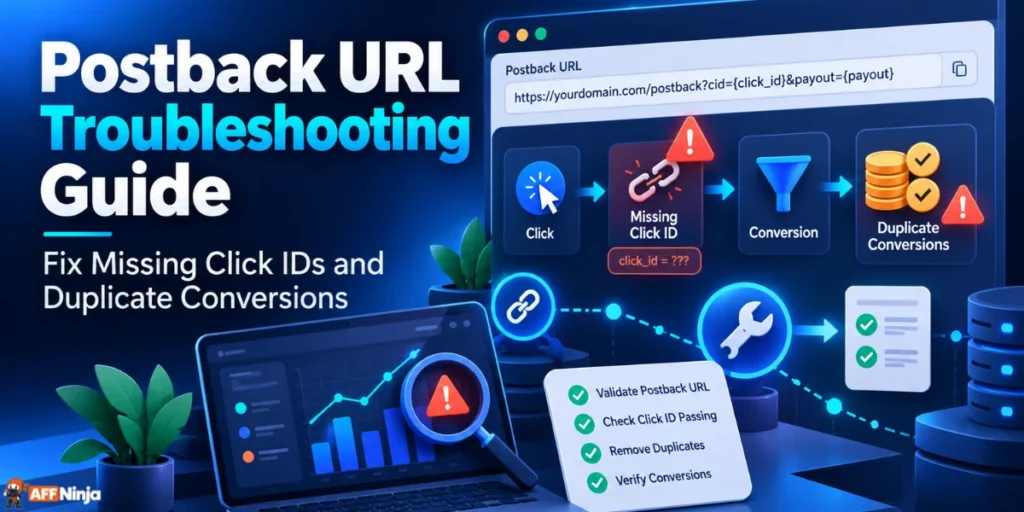
Your postback URL is the quiet piece of your funnel. Until a conversion goes missing.
One lost click ID and real sales vanish from your tracker. One double fire and a single lead shows up twice.
Both bugs burn the budget.
Missing click IDs starve your traffic source of conversion signal. Duplicate conversions inflate ROI and trick you into scaling losers.
Our media buying team has chased both across Voluum, Keitaro, Binom and RedTrack. The fix usually hides in one token, one redirect or one setting.
So let's find yours. This guide maps exactly where S2S postback tracking breaks, how to read postback logs, and how to kill duplicates for good.
The Click ID Relay and the Four Handoffs Where Tracking Breaks
A postback is a relay race. Your click ID is the baton.
Every handoff is a chance to drop it. Before touching any setting, know which handoff failed.
Missing conversions almost always break in handoff 2 or 3. Duplicates usually come from handoff 3 or 4.
Keep that split in mind. It cuts your debugging time in half.
| Handoff | Data Moving | Typical Token | What Breaks Here |
|---|---|---|---|
| Source → Tracker | Traffic source click ID | ${SUBID} on PropellerAds, {click_id} on MGID | No external ID, so no conversion goes back to the source |
| Tracker → Offer | Tracker click ID | {clickid} in Binom, Voluum and RedTrack, {subid} in Keitaro | Lander CTA or redirect strips the ID |
| Network → Tracker | Your click ID plus payout and status | {sub1}, {aff_sub}, #s2# | Wrong sub field, wrong macro syntax, retries |
| Tracker → Source | Source click ID plus event | {externalid}, {ref_id}, {external_id} | Double events, wrong event type |
Postback Debugging Triage to Match Your Symptom With the Real Cause
Don't guess. Start with the symptom.
Each one points to a short set of suspects. Use the table below as your first stop.
| Symptom You See | Most Likely Cause | First Thing to Check |
|---|---|---|
| Network shows conversions, tracker shows zero | Postback never sent or sent to the wrong URL | Network postback log and the global postback field |
| Postback log shows an empty click ID | Tracker ID never reached the offer | Offer URL token and the lander CTA link |
| Postback arrives with literal {clickid} | Network macro not replaced | Macro syntax for that network platform |
| Click ID arrives but “not found” | ID altered, truncated or expired | Compare raw ID in click log against postback value |
| Some conversions track, some don't | One lander, one offer or one device path drops the ID | Break down missing sales by lander, OS and browser |
| Two conversions per sale | Pixel and postback both firing, or global plus offer postback | Every active pixel and postback on the offer |
| Conversions double hours later | Network retry or status update read as new | Duplicate mode and transaction ID handling |
| Tracker is right, traffic source is inflated | Outgoing postback fires on every event | Traffic source postback event rules |
Postback Parameter Cheat Sheet for Voluum, Keitaro, Binom, RedTrack and ClickFlare
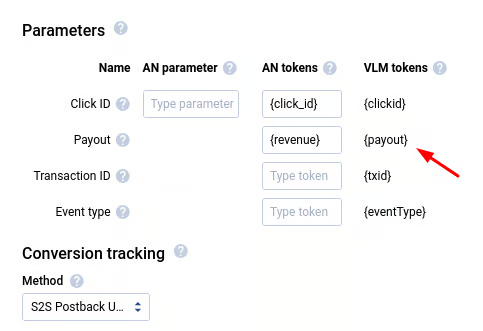
Every tracker speaks its own dialect. Same job, different parameter names.
Use a parameter your tracker doesn't recognize and the conversion is gone. No warning, no error on your side.
| Tracker | Click ID Parameter | Unique Transaction Parameter | Status / Event Parameter | Payout |
|---|---|---|---|---|
| Voluum | cid (or c, with cid winning if both appear) | txid | et for custom conversion types | payout or p |
| Keitaro | subid (mandatory) | tid | status (mandatory) | payout, negative values allowed |
| Binom | cnv_id | Upsell checkbox controls repeat handling | cnv_status and cnv_status2 | payout |
| RedTrack | clickid | rdtk_event_id | Conversion type or status | Set in the offer source template |
| ClickFlare | click_id only | txid | Event settings | payout |
AFFNinja Note
ClickFlare rejects variants like cid or id. Voluum wants cid. Keitaro wants subid.
Copy a postback template from one tracker into another and you've built a silent conversion leak.
Keitaro softens this a little. Its Parameters → Alias setting maps a network's own names, like clickid or type, onto the standard ones.
Still, the safest move is simple. Generate the postback from your tracker's own network template every time.
Why Click IDs Go Missing Between Your Tracker and the Offer
This is where most leaks live. The tracker did its job. The ID just never made it to the network.
The Offer URL Never Carried the Token
Sounds obvious. Happens constantly.
Binom wants {clickid} appended to the offer link. Keitaro passes {subid} through network templates automatically, using the template's Offer Parameters section.
Without a template, Keitaro needs those parameters added to the offer URL by hand.
Prelander CTA Links That Strip the Click ID
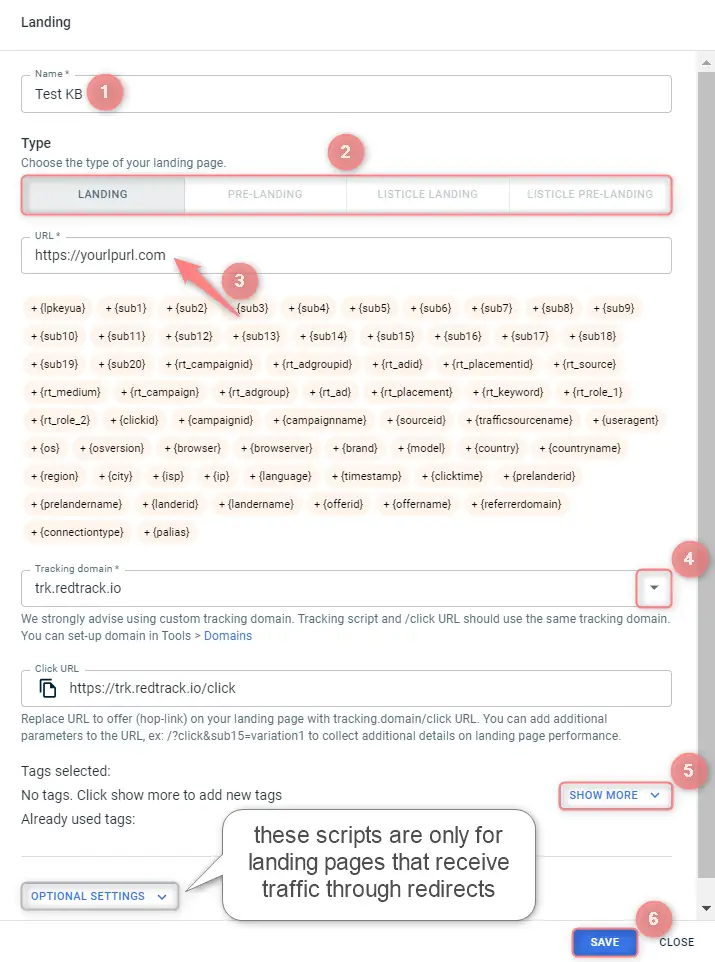
Direct linking rarely loses IDs. Landers do.
If your lander button points straight to the raw offer URL, the tracker never gets to inject its click ID. The network receives a naked click.
This hits nutra COD funnels hard. Order forms often post to a separate script that never sees the URL parameter.
Sub Field Mismatch Between Offer Link and Postback
You send your ID in sub1. The network postback returns sub2.
Result? The postback fires, the tracker reads an empty or foreign value, and the sale disappears.
Keitaro's own pattern makes the rule clear. Send the ID as sub1={subid}, then map it back in the network postback as subid={sub1}.
Same field out, same field back. Every time.
Watch for a sneakier variant too. Sometimes an order number or a network transaction ID lands in the click ID slot. That means the postback reads from the wrong parameter entirely.
Macro Syntax That Belongs to Another Platform
Every network platform wraps macros differently. Curly braces on one, hash signs on another.
Use the wrong wrapper and the macro never resolves. Your tracker receives the raw text {sub1} instead of a real ID.
| Platform | Macro Syntax | Click ID Example | Notes |
|---|---|---|---|
| Everflow | Curly braces | {sub1}, {transaction_id} | Requires GET requests, POST fails silently |
| CAKE | Hash signs | #s2# | Uses session hours as the click lifetime |
| TUNE (HasOffers) | Curly braces | {aff_sub} | Common in older CPA networks |
| Affise | Curly braces | {sub1} to {sub8} | Payout via {sum}, status via {status} |
| PropellerAds | Dollar plus braces | ${SUBID} | Returned as visitor_id in its postback |
| MGID | Curly braces | {click_id} | Returned as c in its postback |
On Everflow based networks, macro mismatch is one of the most common postback errors. Only a missing transaction_id shows up more often.
Encoding, Truncation and Altered Values
Sometimes the ID arrives. Just not intact.
Keitaro offers raw placeholders with a leading underscore, such as {_external_id}, to insert values without extra encoding.
ClickFlare marks these cases “Unattributed” and points to misspelled or altered IDs as a top cause.
Cookies, In App Browsers and Safari Link Tracking Protection
Cookie based tracking adds another weak spot. If the click ID lives only in a cookie, any browser switch kills it.
A user taps your ad inside a social app, then opens the lander in Safari. New browser, no cookie, no ID on the CTA click.
Passing the ID in the URL through every step is the safer setup.
Then there's Apple. Safari's Link Tracking Protection strips user level click identifiers like fbclid and gclid.
Generic tracker parameters have generally survived so far. Still, test your own parameter names in Private Browsing before blaming the network.
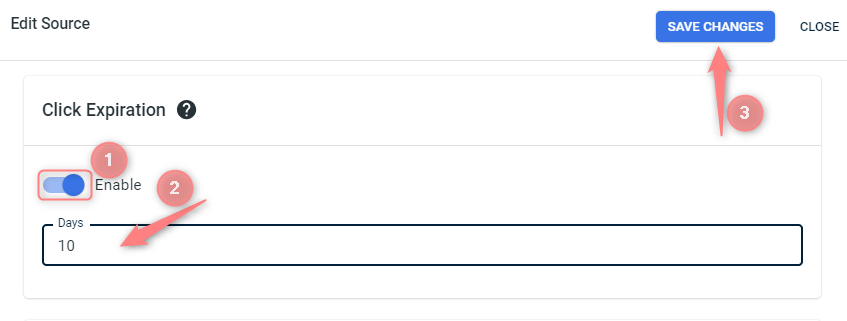
Expired Click IDs and Attribution Window Settings
A valid ID can still fail. It just arrived too late.
Long cycle offers like finance leads or subscription rebills need these windows checked first.
Wrong Domain, Key or Request Method
Sometimes the ID is perfect. The URL around it isn't.
Status Values Your Tracker Doesn't Understand
Keitaro needs both subid and status. Missing either one and the postback can't be processed.
Send a status Keitaro doesn't recognize and the postback gets ignored, then logged.
The fix is status training. Parameters like sale_status or rejected_status map a network's custom values onto Keitaro's types.
Keitaro's standard types are lead, sale, rejected, registration, deposit and trash, plus custom ones.
Reading Postback Log Errors Like a Media Buyer
Logs don't lie. Dashboards sometimes do.
Every serious tracker and network keeps a postback log. Learn to read it and half your support tickets disappear.
| Log Message | Where You'll See It | What It Really Means | Fix |
|---|---|---|---|
| Incorrect subid “”. Postback ignored. | Keitaro | Network sent an empty click ID | Confirm subid={sub1} and the matching sub field |
| SubID not found | Keitaro | Value doesn't match any tracked click | Compare raw values, check for alterations |
| Incorrect postback code | Keitaro | Old or wrong postback key | Copy the current postback URL again |
| Empty postback log | Keitaro | Network never fired anything | Add the URL to the network's postback field |
| Invalid click_id | CAKE | ID captured wrong or altered | Retrace capture from offer link |
| Expired click_id | CAKE | Postback arrived after session hours | Increase session hours |
| Conversion exists | Affise | Duplicate rejected by uniqueness rules | Expected unless the event should be unique |
| Unattributed | ClickFlare | ID expired, misspelled or never existed | Fresh test click, manual upload for old ones |
AFFNinja Field Note
Network “test postback” buttons usually send a fake ID. Keitaro calls this out directly.
Your tracker can't match a click that never happened. Test with a real click through a real campaign link.
Duplicate Conversions and Where Double Counting Really Comes From
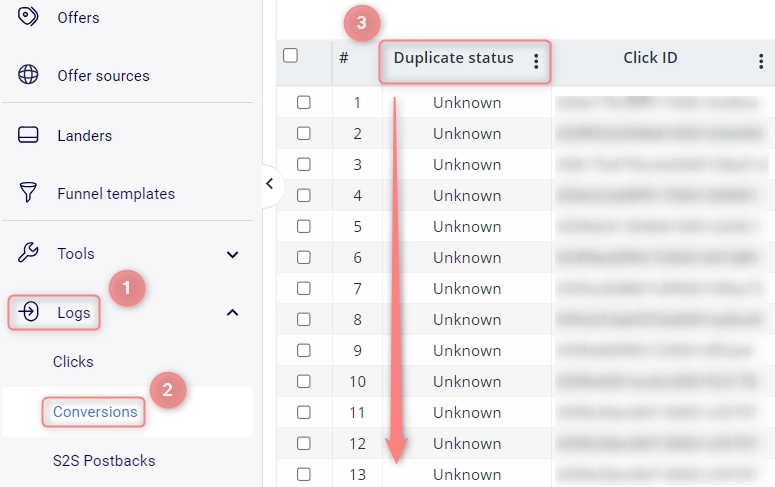
Missing conversions hurt. Duplicate conversions lie to you.
A campaign showing 140% ROI with doubled leads looks like a winner. You scale it. Then the network report lands, and the real number is half.
Here's where doubles come from.
Double Firing From Two Sources
Network Retries and Thank You Page Reloads
Your tracker responds slowly. The network times out and retries.
Now two identical postbacks exist for one sale. Without a unique transaction ID, some setups count both.
Pixels have their own version. A user refreshes the thank you page and the pixel fires again.
Status Updates Read as New Conversions
CPA offers rarely send one postback per lead. They send a lead, then an approval, sometimes a rejection.
If your tracker treats each one as fresh, a single lead counts three times. Pay attention to conversion status updates in sweepstakes and COD offers especially.
Upsells, Rebills and Multi Event Offers
Not every repeat is a duplicate. A rebill is real money.
The trick is telling your tracker which repeats to keep. That's where transaction IDs come in, covered below.
| Duplicate Source | How It Looks in Reports | Fix |
|---|---|---|
| Pixel and postback both live | Exactly 2x conversions on every sale | Remove one, keep S2S |
| Global and offer postback | 2x on specific networks only | Disable one level |
| Network retries | Random doubles, often seconds apart | Unique transaction ID per conversion |
| Thank you page reload | Doubles minutes apart, pixel only | Move to server postback |
| Status flow | Lead count higher than network approvals | Overwrite mode or status mapping |
| Upsell sent without ID | Extra conversions instead of extra revenue | Unique txid or payout increment mode |
How Voluum, Keitaro, Binom and RedTrack Handle a Repeat Postback
Same click ID arrives twice. What happens next depends entirely on your tracker.
This is the table most media buyers never check. Then they wonder why numbers don't match.
| Tracker / Platform | Default Behavior on a Repeat Click ID | How to Allow Real Repeats |
|---|---|---|
| Voluum | Duplicate click IDs discarded automatically | Unique txid per conversion. Same cid plus same txid counts once |
| Keitaro | New postback with different parameters overwrites the previous conversion. Identical parameters get reprocessed, but no S2S postback resends | Unique tid records a separate conversion |
| Binom | Latest payout replaces the earlier one | Upsell checkbox on the offer sums payouts |
| RedTrack | Depends on the duplicate postback mode you pick | Mode per conversion type or per offer source |
| ClickFlare | Click ID tracked once | Unique txid per postback |
| Affise | Only the first postback per click ID and goal succeeds | action_id makes each conversion unique |
| CAKE | Logs Duplicate conversion when dedup triggers | unique_id with your order ID |
RedTrack Duplicate Postback Settings Explained
RedTrack gives you the most control here. Six modes, each with a clear job.
One detail matters a lot. A conversion type's duplicate mode overrides the status mode set in the offer source.
Also, for API integrated channels, RedTrack pushes edits through the API. The channel matches by click ID and updates without creating doubles.
Exclusive

RedTrack Duplicate Postback Settings: Save 20% Today
Fix conversion tracking errors with RedTrack using code AFFNINJAMAX for 20% OFF for 3 Months on your subscription.
Unique Transaction IDs Are the Real Cure for Duplicate Conversions
Duplicate filters guess. Transaction IDs know.
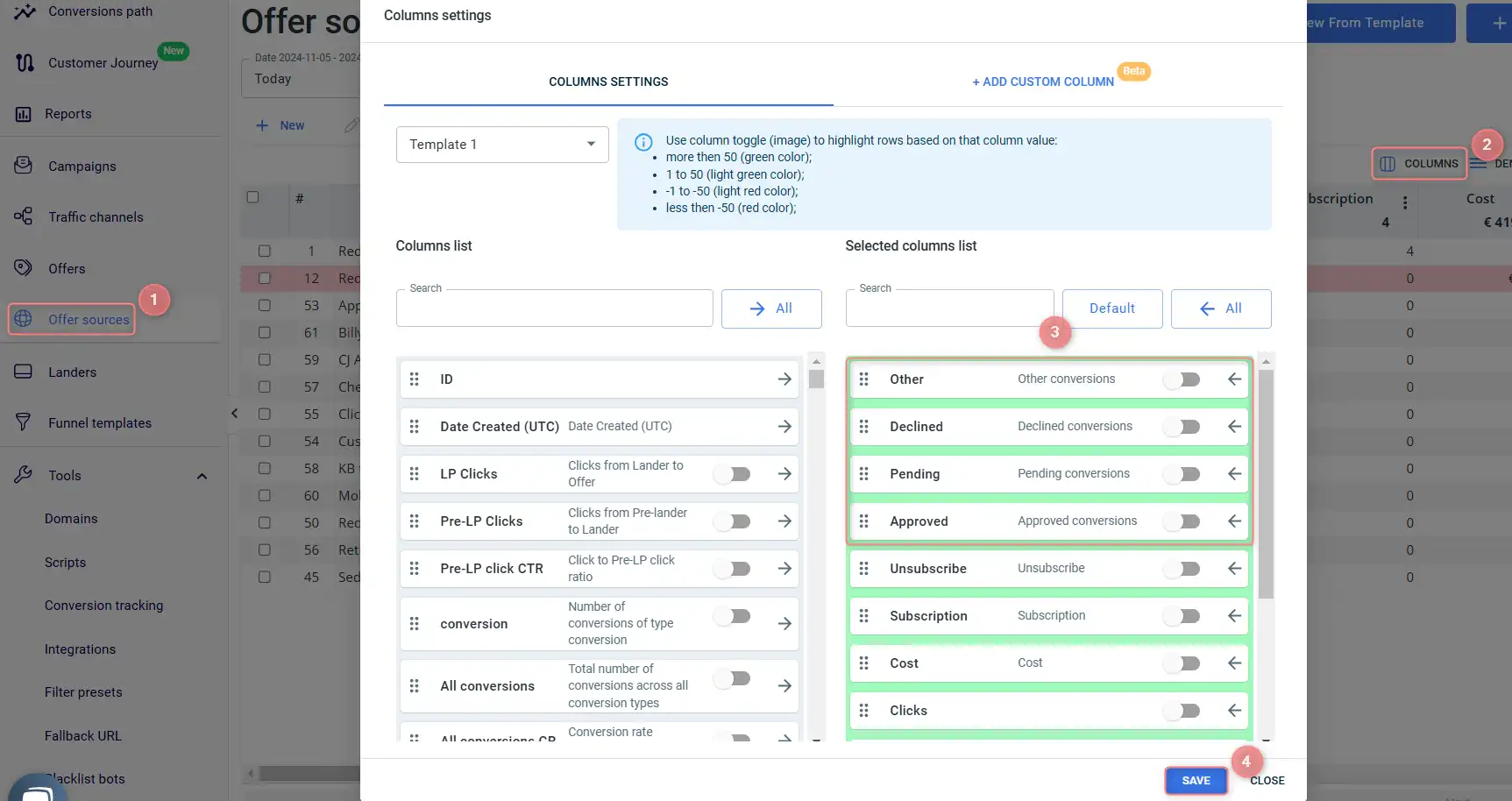
A unique transaction ID tells your tracker one simple fact. This event is new, or this event already happened.
Every platform names it differently.
Rules for Using Transaction IDs Correctly
Keitaro shows how this plays out. A conversion updated under the same tid changes in place. A new tid with a rebill status adds to the total instead.
Affise has one trap worth knowing. If the same action_id arrives with a different click ID, the conversion isn't registered and you get Conversion exists.
Sending Clean Conversions Back to Your Traffic Source Postback
Your tracker can be perfect and your traffic source still wrong. The last handoff needs its own check.
Bid algorithms on push, pop and native sources learn from this signal. Doubles teach them to chase junk placements.
External ID Capture Comes First
Voluum puts the requirement plainly. Pass the source's click ID in the campaign URL, map it to {externalid}, then use that token in the source postback.
Skip any step and conversions never show up in the source.
Using PropellerAds? Its click ID macro is ${SUBID}. The postback goes to ad.propellerads.com/conversion.php with aid, tid and visitor_id.
On MGID, s2={click_id} carries the ID. The postback returns it as c, with valid events lead, reject and sale.
Controlling Which Events Fire to the Source
Optimizing a source for sales? Make sure leads and rejections aren't firing as conversions too.
Meta and TikTok Event Deduplication Windows
Buying on Meta or TikTok with a pixel plus server events? Different rules apply.
Both platforms deduplicate by event ID. Get it wrong and every purchase counts twice inside the ad account.
Meta generally keeps whichever event arrives first. TikTok keeps the first one too.
So generate one event ID per conversion and reuse it across browser and server. Never two separate IDs for the same purchase.
Step by Step Postback Troubleshooting Guide From Click to Conversion
Here's the exact order our team follows. Short, boring, and it works.
Step 1. Generate One Real Test Click
- Open your campaign link on a clean browser, ideally a mobile device on the target GEO.
- Go through the lander and click the CTA like a real user.
- Copy the final offer URL from the address bar.
Step 2. Confirm the Click ID Reached the Offer
- Check the sub parameter in that final URL. It needs a real value, not a placeholder or blank.
- Compare it with the click ID in your tracker's click log. Character for character.
- Blank here? The leak is your offer URL or lander CTA.
Step 3. Audit the Network Postback URL
- Confirm the domain, path and key match your tracker's current postback URL.
- Check the returned sub field matches the one used in the offer link.
- Verify the macro syntax fits the network platform.
- Make sure only one postback level fires, global or offer.
Step 4. Fire a Manual Postback With the Real ID
Skip the network's test button. Fire the postback yourself in a browser, Postman or curl.
curl "https://your-tracker-domain/postback-key/postback?subid=REAL_SUBID&status=lead&payout=1"curl "https://your-tracker-domain/click.php?cnv_id=REAL_CLICKID&payout=1&cnv_status=test"The first line fits Keitaro. The second fits Binom. Swap in your own tracker's parameter names.
ClickFlare says a successful manual test shows within about a minute.
Step 5. Read the Tracker Postback Log
- Find your test postback in the log.
- Match any error against the log table above.
- No record? The request never reached the tracker. Check domain and key again.
Step 6. Fire the Same Postback Twice
- Send the identical request again to test duplicate handling.
- Then send it with a new transaction ID to test upsell handling.
- Confirm the report shows what you expect for both.
Step 7. Verify the Traffic Source Received One Event
- Check the source's conversion column after your test.
- Confirm one conversion, correct event type and correct payout.
- Then remove or reject test conversions so they don't pollute optimization.
Vertical Specific Postback Traps Media Buyers Hit Most
Different verticals break postbacks in different ways. Here's where we see trouble most.
| Vertical | Typical Postback Flow | Main Risk | Setup to Use |
|---|---|---|---|
| Nutra COD | Lead, then approved or rejected after a call | Status updates counted as new leads | Overwrite on same ID, statuses mapped to hold, sale and rejected |
| iGaming and betting | Registration, then FTD, sometimes RevShare | Reg and FTD merged or overwritten | Separate types like Keitaro's registration and deposit, unique ID per deposit |
| Dating and sweeps | Single SOI or DOI event | Thank you page pixel doubles | Pure S2S postback, no pixel |
| Subscriptions and mobile content | First payment, then rebills | Rebills dropped as duplicates | New transaction ID per payment, payout increment mode |
| Ecommerce upsells | Purchase, then upsell | Upsell overwrites first purchase | Binom Upsell checkbox, RedTrack increment payout mode |
One more note for RevShare deals. Keitaro accepts negative payout values, which helps when chargebacks or negative player balances come back as postbacks.
RedTrack's statuses option also works for COD offers without extra setup, while conversion types need configuration first.
Keeping Your Postback Setup Clean Over Time
Fixing a leak once is easy. Keeping it fixed takes a habit.
Binom's manual update has one useful switch. Check Disable Upsell to rewrite conversions instead of adding payouts on top.
Keitaro can't delete conversions from its database. Set wrong ones to rejected instead.
For deeper reporting habits, our guides on ad campaign reporting and ad campaign optimization pair well with this one.
Quick Verdict on Postback URL Troubleshooting
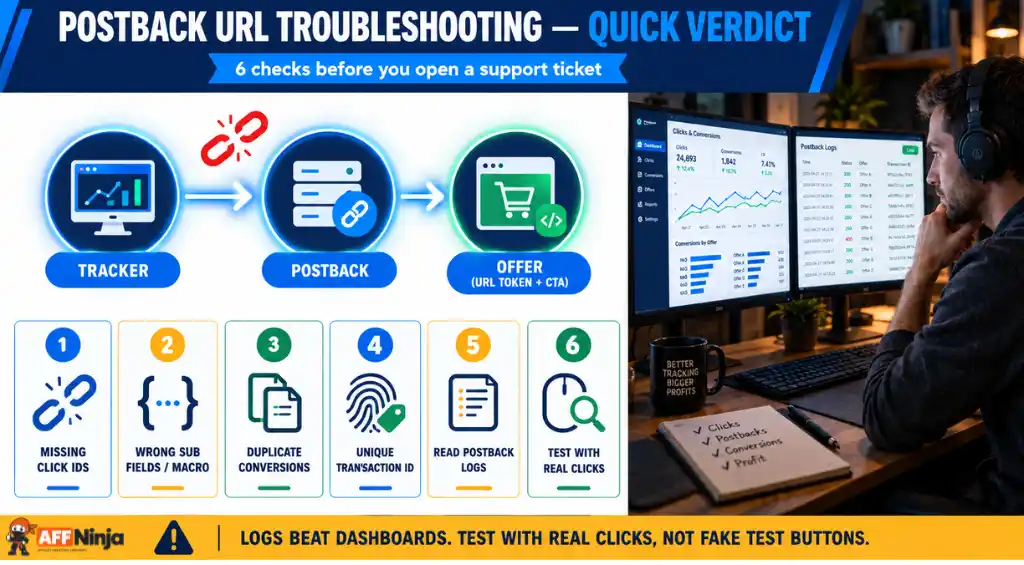
The Bottom Line
Conclusion
Postback bugs feel random. They aren't.
Every missing conversion traces back to one dropped handoff. Every duplicate traces back to one extra fire or one missing transaction ID.
Map the relay. Read the logs. Fire real test clicks.
Once your postback URL troubleshooting becomes a routine, your tracker numbers start matching the network. Your traffic source starts optimizing on real sales.
And you finally scale campaigns based on truth, not doubled leads.

Dominate Affiliate Marketing like the Top 1% Earners
Join 69,572+ winning affiliates in our exclusive newsletter packed with
proven strategies, tools, and secrets to skyrocket your success.
Affiliate Disclosure: This post may contain some affiliate links, which means we may receive a commission if you purchase something that we recommend at no additional cost for you (none whatsoever!)