

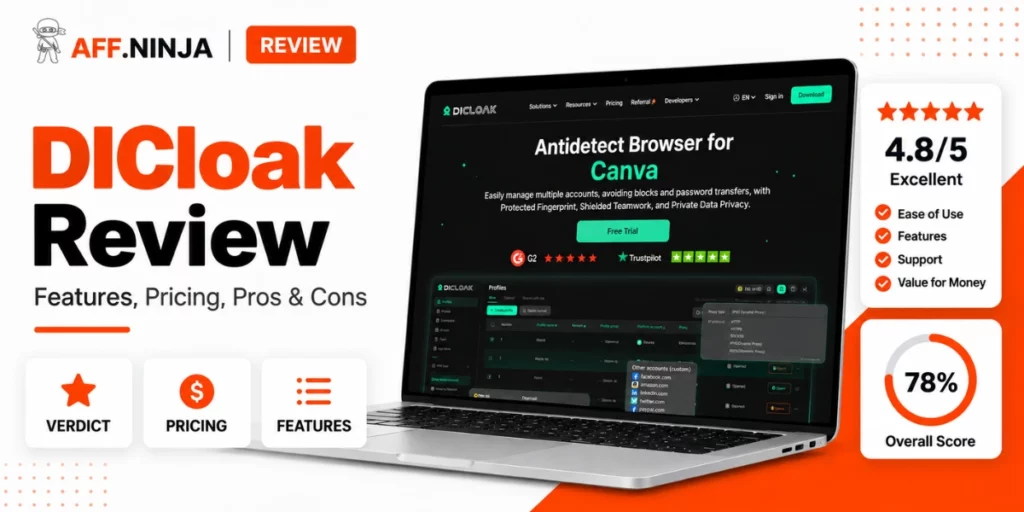
DICloak is a Chromium-based antidetect browser for multi-account management. Each profile keeps its cookies and browser data separate, with configurable fingerprint settings and the option to assign a proxy. This helps manage multiple accounts without mixing their browser sessions.
However, profile isolation does not guarantee that Facebook, Amazon, TikTok or other platforms will treat each account as a completely separate person.
A permanent free plan gives 5 profiles. Paid plans start at $8 a month for 20 profiles and 2 members on Base. DICloak also offers a free RPA Market, team account-sharing controls and a Browser MCP Server, with access and usage subject to the relevant plan.
Great value for media buyers and small teams. Plus targets advanced automation, while Share+ focuses on larger teams with higher member and usage needs.
AffNinja is run by media buyers. Our team has pushed more than $10M in ad spend through Meta, Google and native networks across more than seven years, with antidetect browsers playing a regular role in our campaign setup and account management.
We have already reviewed AdsPower, Dolphin Anty, GoLogin and Multilogin. DICloak kept popping up in our Telegram groups, so we paid for a Plus plan with our own card and used it as our daily driver for ad launches, Etsy listings and a few TikTok RPA runs.
Bottom Line Upfront on DICloak
4.4 out of 5
Strong value, easy to learn, with useful free automation features
What DICloak Antidetect Browser Actually Is

DICloak is made by DICloak Technology Limited. At the time we wrote this, more than 6,800 teams across 135+ countries use it, and the interface ships in 9 languages including English, Chinese, Russian, Vietnamese, Portuguese, Spanish, German and French.
Think of it as a Chrome that has been split into hundreds of sealed rooms. Each DICloak Browser Profile keeps its own fingerprint, cookies, session data and other Profile data separate. Users can also assign a separate proxy to each Browser Profile when needed, but a proxy is not automatically included with every Profile.
It is listed on both G2 and Trustpilot, which matters to us because a lot of tools in this niche hide from public reviews. The desktop client is available for Windows, macOS and Linux. There is currently no mobile app.
Exclusive
DICloak Coupon: Get 20% Off Antidetect Browser
Grab DICloak 20% Off with code AFFMAVEN20 for secure browser profiles, multi-login, account isolation, and easier team management.
DICloak Key Features We Used Every Day
This is the longest part of the review because it is where the money is. We cover each feature the way we used it, not the way a brochure would.
Browser Fingerprint Spoofing Across IP, WebGL, WebGPU and Canvas

Every new profile gets its own fingerprint configuration. DICloak lets you configure the user agent, screen resolution, fonts, time zone, language, canvas fingerprint, WebGL fingerprint and WebGPU behaviour. Available options include real values, noise and IP-based settings, depending on the parameter.
Geo location, language and time zone can follow the proxy when their IP-based settings are enabled. Check the detected location and time zone rather than assuming that every IP in a country resolves to its capital.
Separate fingerprints, cookies and other Profile data help reduce shared browser signals between browser profiles, although platforms may still use other account, network, or behavioral signals when evaluating connections between accounts.
Isolated browser profiles Without the Overhead of Full Virtual Machines
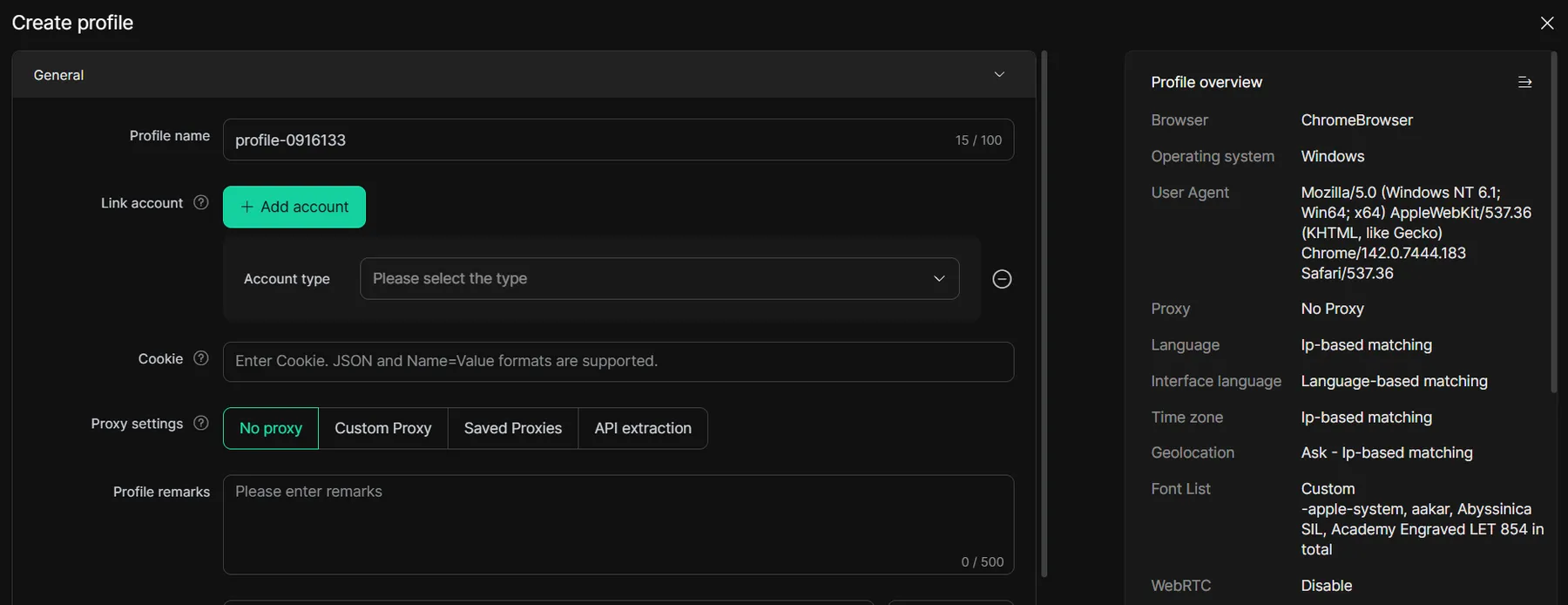
Each profile behaves like its own small computer. Local storage, IndexedDB, cache, extensions and cookies are walled off. Browser profiles can provide a more resource-efficient way to keep browser sessions isolated than running a separate full virtual machine for each account.
The practical upside is speed. Opening a profile is a couple of seconds, not the minute a VM needs to boot. That matters when a media buyer is flipping between 40 accounts before lunch.
Cloud Sync and Multi Device Profile Access
With data sync enabled, supported profile data can move between computers and preserve an existing session. Synced Profile data can help preserve existing sessions across devices, although some websites may still request a fresh login or 2FA based on their own security checks.
We used this constantly. One buyer set up campaigns in the morning at home, and a second buyer picked up the same profiles at the office after lunch.
Worth knowing
Simultaneous multi device login for an individual team member is a Plus feature. On Base and Share+, each member is limited to one device at a time. That is separate from allowing different authorised members to use assigned account profiles.
Flexible Proxy Configuration With HTTP, HTTPS, SOCKS5 and PuraRoute

Proxies are pasted per profile or in bulk, and DICloak accepts HTTP, HTTPS and SOCKS5 proxies. PuraRoute Proxy is available directly under Proxies, with static and dynamic residential proxies that users can purchase and connect to Profiles inside DICloak. Compatible external proxy providers are still supported.
Proxies are not bundled with any plan. Budget for them separately.
Team Account Sharing With Configurable Access Controls

Team account sharing uses Profiles, Members and permissions. An admin prepares a logged-in profile, enables the required data sync and assigns access to authorised members. Share+ supports this workflow.
Password protection, DevTools restrictions, extension restrictions and website access rules are configured individually, not applied automatically through a single switch. Password-viewing restrictions are available on Plus and Share+; Cookie Encryption Enhancement is an optional paid Share+ add-on.
This is different from Share Profile, the Plus feature for sharing a profile with another DICloak team. Its absence from Share+ does not stop internal team account sharing.
The practical use is authorised access to client or company accounts without circulating credentials. Check the service’s licence and account-sharing rules; browser controls do not make sharing a per-user SaaS seat permissible.
Team Collaboration, Permission Management and Transfer Super Admin

Teams are organised into groups. Each member gets granular permissions on what they can open, edit, export or delete. Team data isolation means a junior buyer only sees the profiles assigned to them.
Transfer Super Admin is the sort of feature nobody thinks about until the day they desperately need it.
Free RPA Market Templates for TikTok, YouTube, Amazon, Etsy and X

The RPA Market is a useful part of DICloak. Ready made RPA templates are free to import, with task and execution limits depending on the plan. The library includes
Templates can be edited step by step in a visual builder, no code required. We tweaked the Cookie Bot to hit our own list of niche sites and it just worked.
Synchronizer for Mirrored Actions Across Profiles

The synchronizer mirrors mouse and keyboard actions from one main window into the other selected profiles. Type a comment once and it lands in twenty accounts. Click accept on twenty Business Manager invitations in one motion.
Synchronizer is included on Plus, not Share+. Check the selected windows and watch the first run before applying an action across client accounts.
AI Assisted Scraping and Browsing
DICloak’s AI web scraping interface accepts a page URL and a prompt, with an option to use a profile that has proxy or login settings. The site lists scraping tools for Google Maps, Shopee, Amazon and other services. Its Browser MCP integration also lets compatible AI agents control profiles.
It is not a full scraping platform like Apify. It offers a way to request structured data without writing a selector; results still need checking.
Profile Import From Other Antidetect Browsers

Moving from Dolphin Anty, AdsPower or GoLogin does not always require rebuilding profiles by hand. DICloak supports file-based and API-based profile migration, depending on the source browser.
AdsPower Excel exports can be imported through Profiles > Batch Import > Other Templates. GoLogin and Dolphin Anty support API-token migration through Open API > Migrate Profiles.
Transfer coverage varies. API cookie migration requires a paid plan with the source browser; local extension data and bookmarks are not migrated through that route, and incompatible settings can revert to DICloak defaults.
Check a sample after import. Matching the proxy country alone does not guarantee that a session will stay logged in.
Batch Create, Batch Import, Clone, Export and Restore Profiles
Every bulk action a scaled operation needs is here. Batch create a hundred profiles with proxies from a spreadsheet. Batch update their proxies later. Clone a profile with the data you choose to copy. Export supported profile data. Restore a deleted one.
All of these are locked on the free plan, which is fair, but worth noting before an evaluation.
Extension Market and Chrome Add ons
DICloak has its own extension market and also supports regular Chrome Web Store extensions. Free accounts get 3, Base gets 5, Plus and Share+ get 100. We kept a cookie editor, a UTM builder and our tracker extension loaded across the team.
DICloak Developer Stack for Automation Builders

This part is for the reader who scripts things. DICloak ships more surfaces than we expected from a browser at this price.
The MCP server works with Claude, OpenAI, Gemini, Cursor and Copilot among compatible AI integrations. There is also an MCP flavoured RPA Market with templates exposed as agent tools. Connecting an AI client and paying for any external model usage are separate from importing a free RPA template.
Free DICloak Tools Worth Bookmarking
DICloak also offers a range of free web tools. Some are useful independently of the browser, especially for quick proxy, fingerprint and account checks.
Who DICloak Is Built For and What We Ran Through It
Step by Step DICloak Setup From Download to First RPA Run
- Step 1: Download the desktop client
Grab the Windows, macOS or Linux installer from the DICloak download page.
- Step 2: Create an account

Sign up with an email. No card is required for the free plan and the 5 profiles are available immediately.
- Step 3: Build the first profile

Click Create Profile, give it a name and add the account details and proxy configuration required for the workflow.
- Step 4: Set the fingerprint
Choose Windows, macOS or Android as the device, then let DICloak randomise the rest. Only touch WebGL or canvas manually if a specific target demands it.
- Step 5: Attach a proxy
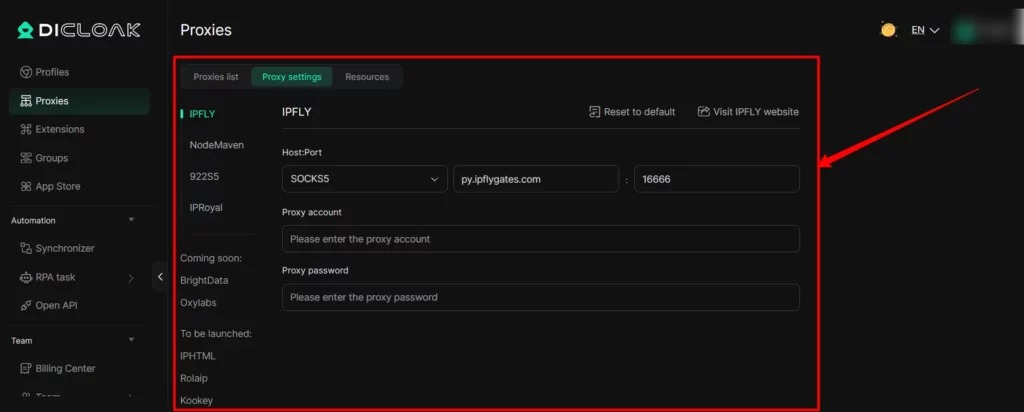
Open Proxies > PuraRoute Proxy to purchase a residential proxy, or add credentials from an external provider using HTTP, HTTPS or SOCKS5. Check the connection, then select the saved proxy in the profile.
- Step 6: Verify with the leak test
Open the profile and load the WebRTC leak test and anonymous check pages. Confirm that the public IP matches the intended proxy and that the real public IP is not exposed. A displayed private-network address alone is not proof of a public-IP leak.
- Step 7: Import cookies
If migrating an existing account, paste the cookie JSON into the profile settings. Cookie Bot can warm a brand new profile instead.
- Step 8: Launch and log in
Open the profile, log into the platform and save the session data. Check the sync settings if the Profile will be used on another device; a website can still require a new login.
- Step 9: Run an RPA template
Open the RPA tab, import a template from the market, pick the target profile and press start. Watch the first run, then schedule it.
- Step 10: Invite team members with permissions
Under Team, add a member by email, assign them to a group and tick which profiles they can open and which actions they can take.
DICloak Pricing in 2026 With Monthly and Yearly Rates

Four standard tiers, plus a Custom option. Yearly billing removes 40%. The figures below are starting prices for the default capacities. Profiles can be expanded on paid plans; Base and Plus member counts also affect the price, while Share+ includes unlimited members.
| DICloak Plan | Monthly | Yearly (per month) | Yearly total | What is included |
|---|---|---|---|---|
| Free | $0 | $0 | $0 | 1 member, 5 profiles, 15 daily opens, 3 extensions, 5 RPA tasks, fingerprint and proxy configuration |
| Base | $8 | $4.80 | $57.60 | 20 profiles, 2 members, 400 daily opens, 5 extensions, batch operations, cloud data sync, team management, seat and profile sliders |
| Plus | $28.80 | $17.28 | $207.36 | 100 profiles, 1 member, 50,000 daily opens, 100 extensions, 500 RPA tasks, Share Profile and Transfer Profile between teams, multi device member login, Open API, dedicated manager |
| Share+ | $138 | $82.80 | $993.60 | 200 profiles, unlimited seats, unlimited daily opens, 5 RPA tasks, Open API, all Base features, dedicated manager |
| Custom | On request | On request | On request | Members, profiles and feature requirements agreed by quotation |
Honest Negatives After Six Weeks With DICloak
The plan choice deserves attention. Plus prioritises advanced features and automation; Share+ prioritises larger teams and greater usage capacity. Teams needing both unlimited members and Plus-only tools should check the available configuration before buying.
DICloak vs Other Antidetect Browsers
These three options make the shortlist for most readers. The comparison highlights their strengths and where a rival has the edge.
| Criteria | DICloak | Octo Browser | Dolphin{anty} |
|---|---|---|---|
| Entry paid price | $8 a month (Base) | €10 Lite with 3 profiles, €29 Starter with 10 profiles | $10 Starter with 10 profiles |
| Free tier | 5 profiles forever, 15 daily opens | None | 5 profiles forever |
| API access | Local API on all plans, Open API from Plus | From €79 Base with rate limits | Local and remote API on paid plans |
| Automation | Free RPA Market, MCP server | API scripting, profile tasks | Scenarios builder, Cookie Robot, synchronizer |
| Team seats | Sliders on Base and Plus, unlimited on Share+ | 3 seats on €169 Team, 8 on €329 Advanced | From $89 Base, extra users $10 each |
| Payment options | Cards, PayPal, BTC, USDT, USDC, ETH | Cards and crypto | Cards and crypto |
Where rivals win
Which DICloak Plan Makes Sense for Each Reader

FAQs Related to DICloak
Is DICloak safe to use with high value ad accounts?
DICloak provides configurable fingerprint isolation, proxy support and team access controls, but no antidetect browser guarantees that valuable accounts will remain unlinked or unrestricted. Check the proxy, fingerprint and access settings before using a live account, and follow the platform’s account rules. This review does not provide an account-survival benchmark or an independent security audit.
Does DICloak run on Mac, Windows and Linux?
DICloak offers native apps for Windows, macOS and Linux. Linux is on v2.9.9, while Windows and macOS are on v3.0.2. The version gap alone does not mean the Linux app has fewer features or performs worse.
Is there a DICloak mobile app or APK?
DICloak currently provides desktop clients for Windows, macOS and Linux, but does not currently provide a mobile app or APK.
Can I import profiles from AdsPower, Multilogin or GoLogin?
DICloak supports file-based and API-based migration, depending on the source browser. AdsPower Excel exports can be imported through Batch Import > Other Templates. For Multilogin, copy the exported profile data into DICloak’s import template, then upload it through Batch Import.
GoLogin supports API-token migration through Open API > Migrate Profiles. Cookie migration through this route requires a paid GoLogin plan. Local extension data and bookmarks are not transferred, and incompatible settings revert to DICloak defaults. Check imported settings and test login sessions after migratio
Does the Open API work with Puppeteer and Playwright?
DICloak’s Local Open API currently supports Python with Playwright, Python with ChromeDriver, Node.js with Puppeteer, and Java with ChromeDriver. When a Profile is launched through the API, DICloak returns the browser connection information needed for the supported automation tools to connect to the running Profile.
Does DICloak include proxies or do I bring my own?
Proxy bandwidth is separate from the DICloak subscription. Buy static or dynamic residential proxies through Proxies > PuraRoute Proxy, or connect a compatible external HTTP, HTTPS or SOCKS5 provider. Check the connection before assigning it to a profile.
Final Verdict on DICloak Antidetect Browser
DICloak is a strong value option among antidetect browsers for affiliates and small agencies. Its free RPA templates, configurable account-sharing controls and MCP integrations give it a useful feature set.
The plan structure remains a point to check. Open API starts at $28.80 a month on Plus, and Share+ starts at $138 without Synchronizer. That is a real trade-off for some teams, but the plans target different needs rather than forming a simple upgrade ladder.
Start on the free plan and check a profile and proxy setup. Choose Base for more profiles and batch tools, Plus for advanced automation, or Share+ when member and usage capacity are the priority.
Dominate Affiliate Marketing like the Top 1% Earners
Join 69,572+ winning affiliates in our exclusive newsletter packed with
proven strategies, tools, and secrets to skyrocket your success.
Affiliate Disclosure: This post may contain some affiliate links, which means we may receive a commission if you purchase something that we recommend at no additional cost for you (none whatsoever!)